Updated: 7 October, 2025
17 July, 2025
In this technical article, we will explore how to improve your DevSecOps processes by integrating Checkmarx ZAP in your GitLab’s CI/CD pipeline. Note that doing this for Github is largely similar with Github actions.
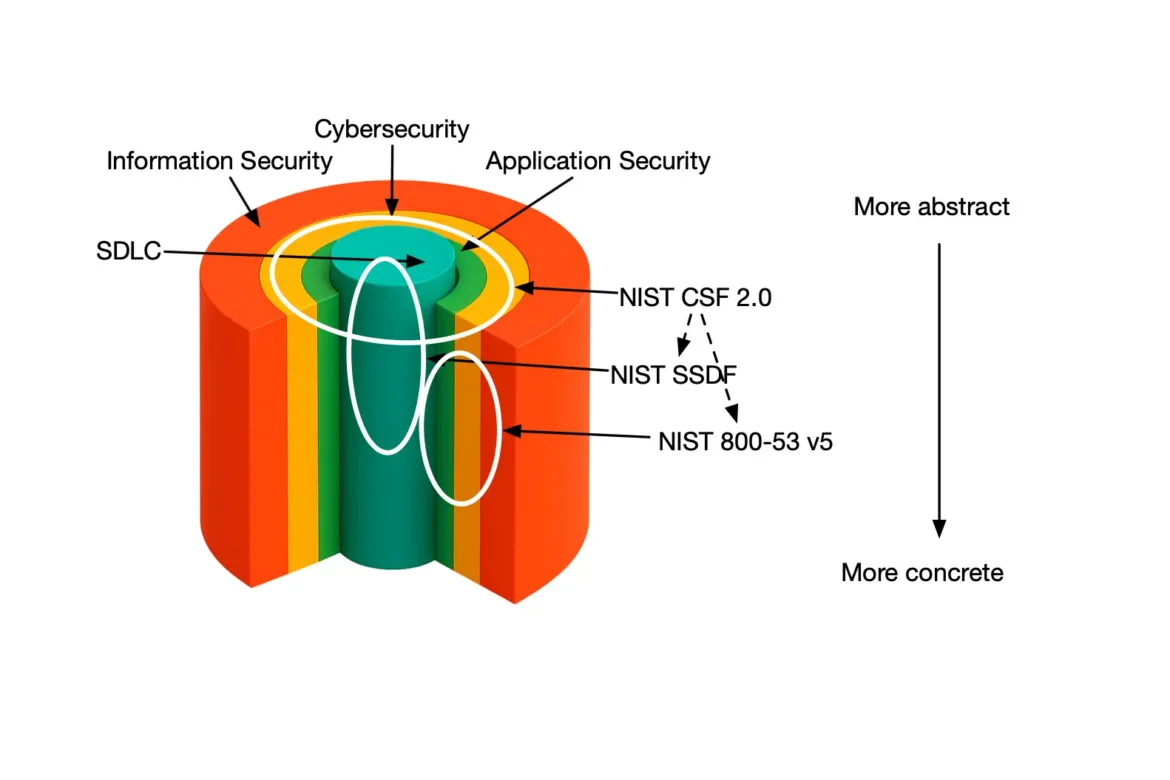
Application security is becoming a priority on a worldwide scale. Both the US (NIST SSDF and Memorandum M-22-18) and the EU (CRA) have recently introduced legislations to aim at high common level of application security and cybersecurity. Meanwhile, the application security state-of-the-practice in large and small firms is far from ideal (to put it mildly). The attack sophistication and absolute numbers are increasing. Paradoxically, we have known the systematic solution to the security challenge. We (the actual security experts) name it a secure software development lifecycle or an AppSec program.
There are several AppSec programs out there (NIST SSDF, Microsoft SDLC, BSIMM, etc) with OWASP SAMM being by far the simplest one to start with. The cornerstones of any AppSec program are People, Process, Knowledge, Tools, Training and Risk. Thus, tooling is just one wheel in the whole machine. To make tooling efficient we should start from the process and fit the tools in the puzzle, rather than trying to reverse engineer the puzzle from the tools.
In this blog, we focus on a small part of our AppSec program, namely secure deploy. We provide a high-level overview of how the process is structured and how we’ve integrated the tool in our process.
What is the Secure Deployment practice
One of the final stages in delivering secure software is ensuring the security and integrity of developed applications are not compromised during deployment. It focuses on removing manual error by automating the deployment process as much as possible, and making its success contingent upon the outcomes of integrated security verification checks. Secure Deployment also fosters Separation of Duties by making adequately trained, non-developers responsible for deployment.
It also goes beyond the mechanics of deployment. Secure Deployment focuses on protecting the privacy and integrity of sensitive data, such as passwords, tokens, and other secrets, required for applications to operate in production environments. In its simplest form, suitable production secrets are moved from repositories and configuration files into adequately managed digital vaults. In more advanced forms, secrets are dynamically generated at deployment time and routine processes detect and mitigate the presence of any unprotected secrets in the environment.
Overall setup
ZAP offers several ways of automating and different ways to scan. The currently recommended way is through ZAP Automation Framework. We use a “baseline” (passive) scan on a nightly schedule. This scan is perfect for running daily because it is lightweight and does not perform any complex attacks. Once a week we also run an “active scan” which is very offensive towards the system and runs for hours. We run both scans against a non-production environment that is an exact replica of the production server (minus the production data obviously).
Listen to the summary of this article on the AppSec Management Podcast.
Authentication setup in ZAP
Authentication setup has been modified in the latest versions of ZAP and this is perhaps one of the most challenging tasks to get right. We will be using the Client script authentication to setup the authentication with ZAP. It is the recommended approach.
We will be also using our own SAMMY acceptance environment as our target application. We will be using a Firefox plugin called ZAP by Checkmarx Recorder extension to create a scripted recording of the authentication process with Zest. Once you press record you should simply login with a valid username and password.
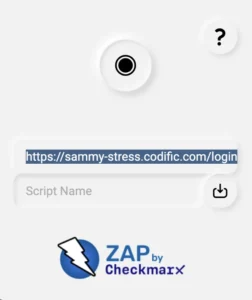
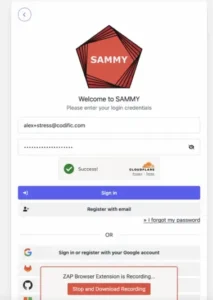
Working with 2 factor authentication (in our case Google TOTP) might be even more challenging with ZAP. So we have slightly modified our application to show the 2FA login code in all stress and debug environments to make things easier for the development team. So the code is automatically pre-populated.
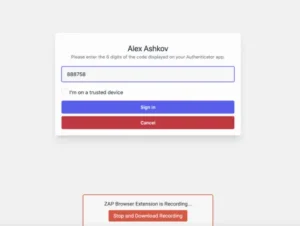
After that we click the “Stop and Download Recording” button. The .zst file should be downloaded.
Headless mode
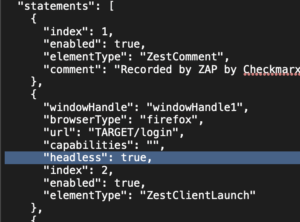
Make sure to update the .zst file and set the headless mode to true, as we will be running this script in the CI/CD pipeline.
Secret management best practices
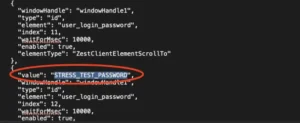
Although the configuration is against a non-production server we will still treat passwords in this script as sensitive. So as a best practice you should configure these as CI/CD variables rather than keeping them in plain text in your repo. So we will replace the username, password and even the URL with variables “STRESS_TEST_USERNAME”, “STRESS_TEST_PASSWORD” and “TARGET/login” (for https://sammy-stress.codific.com/login).
Finally, we will rename the script to zap-auth.zst and we are ready with the authentication setup.
Context setup in ZAP
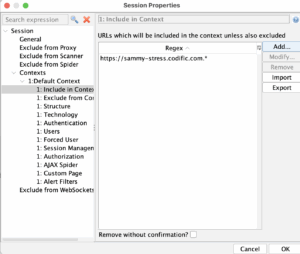
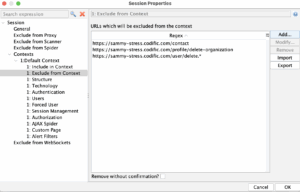
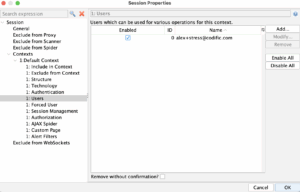
Open ZAP Desktop and create a new context. In the context we will set some URLs to exclude and the main URL to be included. Under “Users’ we will enter the username that we will use for scanning.
Baseline automation plan setup
Now we will create baseline automation plan, which will be the passive scan.
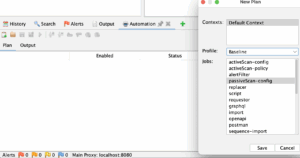
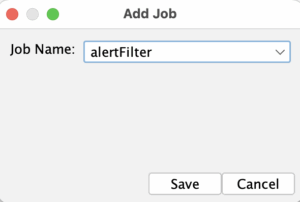
We will also add additional job “alertFilter”, because we want to change some rule risks. For example the “Content Security Policy (CSP) Header Not Set (10038)” risk is with “Medium” risk by default and we will make it “Info”. We will do the same for a couple of other rules.
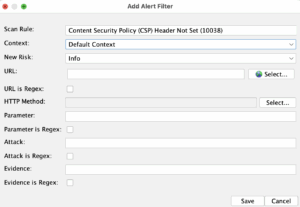
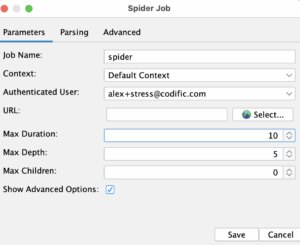
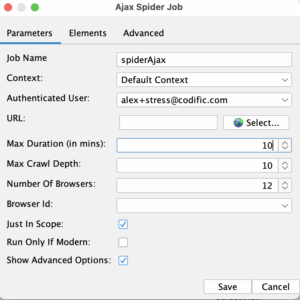
Next, we will go to the “spider” job and choose a context, authenticated user and we will put 10 minute time limit for the scanner job. We will do the same for “spiderAjax”.
We need to setup a couple of report jobs.
- Traditional HTML Report. In the report job we will change the name to baselinescan and we will set the template to Traditional HTML Report.
- Traditional Markdown Report. We will add a second report job that will read from our pipeline and decide if the pipeline should fail. We will add Alert Count and Alert Details sections.
- Authentication report – JSON. The third report job will be used for debugging our authentication.
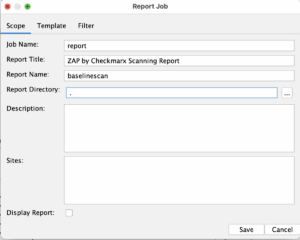
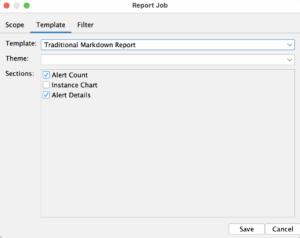
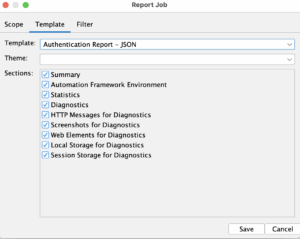
This is what our final plan is looking like.
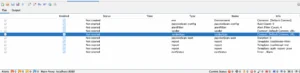
Baseline ZAP scanner YAML file
Save the plan you have prepared as described in the previous section as a YAML file. Make sure to update it as follows:
- Replace the hardcoded URL with “TARGET”
- Replace the hardcoded username with “STRESS_TEST_USERNAME”
- Replace the project directory with “CI_PROJECT_DIR”
- Under “Default context” add URL parameter with the value “TARGET”
- Under “Default context” authentication section add the script path.
- Under “Default context” users credentials section add “STRESS_TEST_USERNAME”
- In each report section replace the “reportDir” with “CI_PROJECT_DIR”
- In each report section replace the “reportFile” with “ZAP_REPORT” or “ZAP_AUTH_REPORT” or “ZAP_ALERT_REPORT”
The final “zap_baseline.yaml” file should look something like this:
env :
  contexts :
    - name : Default Context
      urls :
        - TARGET
      includePaths :
        - TARGET.*
      excludePaths :
        - TARGET/contact
        - TARGET/profile/delete-organization
        - TARGET/user/delete.*
      authentication :
        method : client
        parameters :
          scriptEngine : Mozilla Zest
          diagnostics : false
          script : CI_PROJECT_DIR/zap/testauth.zst
      sessionManagement :
        method : cookie
      technology : { }
      structure : { }
      users :
        - name : STRESS_TEST_USERNAME
          credentials : { }
  parameters : { }
jobs :
  - type : passiveScan-config
    parameters : { }
  - type : alertFilter
    alertFilters :
      - ruleId : 10038
        ruleName : Content Security Policy (CSP) Header Not Set (10038)
        context : Default Context
        newRisk : Info
    parameters : { }
  - type : spider
    parameters :
      context : Default Context
      user : STRESS_TEST_USERNAME
      maxDuration : 10
      parseDsStore : null
    tests :
      - name : At least 100 URLs found
        type : stats
        onFail : INFO
        statistic : automation.spider.urls.added
        operator : '>='
        value : 100
  - type : spiderAjax
    parameters :
      context : Default Context
      user : STRESS_TEST_USERNAME
      maxDuration : 10
      browserId : null
    tests :
      - name : At least 100 URLs found
        type : stats
        onFail : INFO
        statistic : spiderAjax.urls.added
        operator : '>='
        value : 100
  - type : passiveScan-wait
    parameters : { }
  - type : report
    parameters :
      template : traditional-html
      theme : null
      reportDir : CI_PROJECT_DIR
      reportFile : ZAP_REPORT
      reportTitle : ZAP by Checkmarx Scanning Report
    risks :
      - info
      - low
      - medium
      - high
    confidences :
      - falsepositive
      - low
      - medium
      - high
      - confirmed
    sections :
      - instancecount
      - alertdetails
      - alertcount
  - type : report
    parameters :
      template : traditional-md
      theme : null
      reportDir : CI_PROJECT_DIR
      reportFile : ZAP_ALERT_REPORT
      reportTitle : ZAP by Checkmarx Scanning Report
    risks :
      - info
      - low
      - medium
      - high
    confidences :
      - falsepositive
      - low
      - medium
      - high
      - confirmed
    sections :
      - alertdetails
      - alertcount
  - type : report
    parameters :
      template : auth-report-json
      theme : null
      reportDir : CI_PROJECT_DIR
      reportFile : ZAP_AUTH_REPORT
      reportTitle : ZAP by Checkmarx Scanning Report
    risks :
      - info
      - low
      - medium
      - high
    confidences :
      - falsepositive
      - low
      - medium
      - high
      - confirmed
    sections :
      - summary
      - diagnosticswebelements
      - diagnostics
      - diagnosticslocalstorage
      - diagnosticssessionstorage
      - diagnosticsscreenshots
      - diagnosticsmessages
      - afenv
      - statistics
  - type : exitStatus
    parameters : { }
We will create additional “zap_config.conf” file where we are going to list our csrf tokens in the app, so ZAP will know how to find them.
anticsrf.tokens(0).token.name=user[_token]
anticsrf.tokens(0).token.enabled=true
anticsrf.tokens(1).token.name=user_add[_token]
anticsrf.tokens(1).token.enabled=true
anticsrf.tokens(2).token.name=contact_form[_token]
anticsrf.tokens(2).token.enabled=true
anticsrf.tokens(3).token.name=token
anticsrf.tokens(3).token.enabled=true
anticsrf.tokens(4).token.name=_csrf_token
anticsrf.tokens(4).token.enabled=true
anticsrf.tokens(5).token.name=documentation[_token]
anticsrf.tokens(5).token.enabled=true
anticsrf.tokens(6).token.name=documentation[_token]
anticsrf.tokens(6).token.enabled=true
Running ZAP scanner in the CI/CD pipeline
Create a bash script that runs the pipeline. This bash script will replace all the variables with the correct values, run the ZAP automation plan, wait for the report and read it. If there are “High” or “Medium” findings the bash script will fail the pipeline.
#!/bin/bash

sed -i "s/STRESS_TEST_PASSWORD/$STRESS_TEST_PASSWORD/g" zap/zap_baseline.yaml
sed -i "s/STRESS_TEST_USERNAME/$STRESS_TEST_USERNAME/g" zap/zap_baseline.yaml
sed -i "s/ZAP_REPORT/$ZAP_REPORT/g" zap/zap_baseline.yaml
sed -i "s/ZAP_AUTH_REPORT/$ZAP_AUTH_REPORT/g" zap/zap_baseline.yaml

# NOTE:
# We need this because the variable contains / in it.
# More info here https://unix.stackexchange.com/questions/255789/is-there-a-way-to-prevent-sed-from-interpreting-the-replacement-string/255869#255869
ESCAPED_CI_PROJECT_DIR=$(sed -e 's/[&\\/]/\\&/g; s/$/\\/' -e '$s/\\$//' <<<"$CI_PROJECT_DIR")
sed -i "s/CI_PROJECT_DIR/$ESCAPED_CI_PROJECT_DIR/g" zap/zap_baseline.yaml

# NOTE:
# We need this because the variable contains / in it.
# More info here https://unix.stackexchange.com/questions/255789/is-there-a-way-to-prevent-sed-from-interpreting-the-replacement-string/255869#255869
ESCAPED_TARGET=$(sed -e 's/[&\\/]/\\&/g; s/$/\\/' -e '$s/\\$//' <<<"$TARGET")
sed -i "s/TARGET/$ESCAPED_TARGET/g" zap/zap_baseline.yaml
sed -i "s/ZAP_ALERT_REPORT/$ZAP_ALERT_REPORT/g" zap/zap_baseline.yaml
sed -i "s/TARGET/$ESCAPED_TARGET/g" zap/zap-auth.zst
sed -i "s/STRESS_TEST_PASSWORD/$STRESS_TEST_PASSWORD/g" zap/zap-auth.zst
sed -i "s/STRESS_TEST_USERNAME/$STRESS_TEST_USERNAME/g" zap/zap-auth.zst

/zap/zap.sh -configfile $CI_PROJECT_DIR/zap/zap_config.conf -cmd -autorun $CI_PROJECT_DIR/zap/zap_baseline.yaml
returnCode=0
anyAlertsAboveLow=$(grep -E "^\| (High|Medium) \|" $CI_PROJECT_DIR/$ZAP_ALERT_REPORT.md | grep -oE '[0-9]+' | awk '$1>0')

if [ ! -z "$anyAlertsAboveLow" ]
then
  head -n 20 $CI_PROJECT_DIR/$ZAP_ALERT_REPORT.md
  echo "DAST RESULT: There are some vulnerabilities that ZAP has found (those visible here may not be the only ones). See the detailed report for more information."
  returnCode=1
fi

exit $returnCode
This is what our GitLab pipeline YAML file looks like:
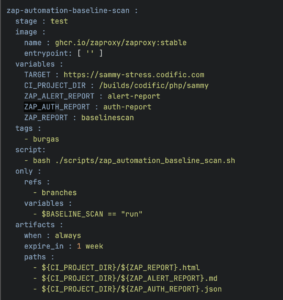
When we run the job this is what our pipeline terminal will look like if ZAP finds vulnerabilities exceeding the pre-defined configuration.
Automation plan succeeded!
# ZAP Scanning Report
ZAP by [Checkmarx](https://checkmarx.com/).
## Summary of Alerts
| Risk Level | Number of Alerts |
| --- | --- |
| High | 0 |
| Medium | 2 |
| Low | 4 |
| Informational | 0 |
## Alert Detail
DAST RESULT: There are some vulnerabilities that ZAP has found (those visible here may not be the only ones). See the detailed report for more information.
Uploading artifacts for failed job
00:02
Uploading artifacts...
/builds/codific/php/sammy/baselinescan.html: found 1 matching artifact files and directories
/builds/codific/php/sammy/alert-report.md: found 1 matching artifact files and directories
/builds/codific/php/sammy/auth-report.json: found 1 matching artifact files and directories
Uploading artifacts as "archive" to coordinator... 201 Created  correlation_id=f38338cce0d3d087b0c195e464b86b3a id=10778668442 responseStatus=201 Created token=69_6pwzYK
Cleaning up project directory and file based variables
00:00
ERROR: Job failed: exit code 1
ZAP finding notifications in Slack
As mentioned earlier, we have configured OWASP ZAP to run as a scheduled task. This decision is open to debate, as it’s also possible to run ZAP as part of your build or deployment pipeline.
The key reasons we chose not to do that are risk and speed. We want our build and deploy pipelines to remain as fast and lightweight as possible. ZAP is just one of many tools running in our pipeline—alongside unit tests, integration tests, acceptance tests, and static analysis tools like SAST and SCA.
We’ve been using ZAP for over four years, and it has proven extremely helpful. On a few occasions, it detected critical vulnerabilities introduced during development. That said, in 99% of cases, ZAP does not find any new issues. This is why we’re comfortable running it as a scheduled task every morning instead of embedding it directly in the pipeline.
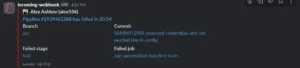
To ensure visibility, we’ve integrated ZAP with Slack. When ZAP finds potential issues, a notification is sent to the relevant project channel so the team is immediately aware and can take action if needed.
ZAP full active scan setup
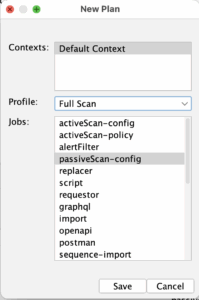
For the active scan the setup is largely the same, except that we choose “Full scan” from the Automation framework options. All the config and steps are the same as for the baseline scan.
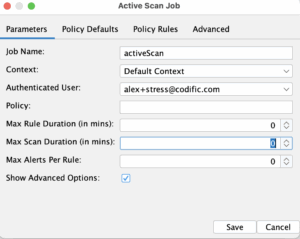
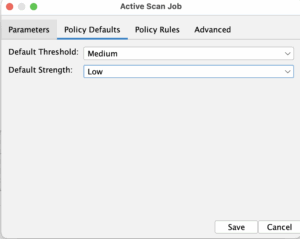
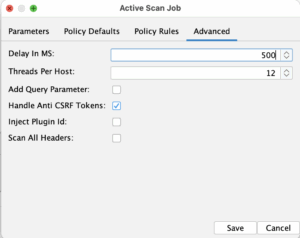
In the full scan job we fill out the authenticated user, the context as well as the max duration for the job. You can play a bit with the advanced option and the policy rules. For our case initially we are going to set 500ms delay and lower the threads to 12. We are also going to lower the “Default strength” to “Low” instead of “Medium”. The point of all this is to make the active scan not so aggressive towards the test system and to be more gentle to the Gitlab runner.
Full ZAP scan YAML file
As a result here is what the full active scan exported plan in YAML version looks like.
env :
  contexts :
    - name : Default Context
      urls :
        - TARGET
      includePaths :
        - TARGET.*
      excludePaths :
        - TARGET/contact
        - TARGET/profile/delete-organization
        - TARGET/user/delete.*
      authentication :
        method : client
        parameters :
          scriptEngine : Mozilla Zest
          diagnostics : false
          script : CI_PROJECT_DIR/zap/testauth.zst
      sessionManagement :
        method : cookie
      technology : { }
      structure : { }
      users :
        - name : STRESS_TEST_USERNAME
          credentials : { }
  parameters : { }
jobs :
  - type : passiveScan-config
    parameters : { }
  - type : alertFilter
    alertFilters :
      - ruleId : 10038
        ruleName : Content Security Policy (CSP) Header Not Set (10038)
        context : Default Context
        newRisk : Info
    parameters : { }
  - type : spider
    parameters :
      context : Default Context
      user : STRESS_TEST_USERNAME
      maxDuration : 10
      parseDsStore : null
    tests :
      - name : At least 100 URLs found
        type : stats
        onFail : INFO
        statistic : automation.spider.urls.added
        operator : '>='
        value : 100
  - type : spiderAjax
    parameters :
      context : Default Context
      user : STRESS_TEST_USERNAME
      maxDuration : 10
      browserId : null
    tests :
      - name : At least 100 URLs found
        type : stats
        onFail : INFO
        statistic : spiderAjax.urls.added
        operator : '>='
        value : 100
  - type : passiveScan-wait
    parameters : { }
  - type : activeScan
    parameters :
      context : Default Context
      user : STRESS_TEST_USERNAME
      maxScanDurationInMins : 60
      delayInMs : 500
      threadPerHost : 12
    policyDefinition :
      defaultStrength : low
      defaultThreshold : medium
  - type : report
    parameters :
      template : traditional-html
      theme : null
      reportDir : CI_PROJECT_DIR
      reportFile : ZAP_REPORT
      reportTitle : ZAP by Checkmarx Scanning Report
    risks :
      - info
      - low
      - medium
      - high
    confidences :
      - falsepositive
      - low
      - medium
      - high
      - confirmed
    sections :
      - instancecount
      - alertdetails
      - alertcount
  - type : report
    parameters :
      template : traditional-md
      theme : null
      reportDir : CI_PROJECT_DIR
      reportFile : ZAP_ALERT_REPORT
      reportTitle : ZAP by Checkmarx Scanning Report
    risks :
      - info
      - low
      - medium
      - high
    confidences :
      - falsepositive
      - low
      - medium
      - high
      - confirmed
    sections :
      - alertdetails
      - alertcount
  - type : report
    parameters :
      template : auth-report-json
      theme : null
      reportDir : CI_PROJECT_DIR
      reportFile : ZAP_AUTH_REPORT
      reportTitle : ZAP by Checkmarx Scanning Report
    risks :
      - info
      - low
      - medium
      - high
    confidences :
      - falsepositive
      - low
      - medium
      - high
      - confirmed
    sections :
      - summary
      - diagnosticswebelements
      - diagnostics
      - diagnosticslocalstorage
      - diagnosticssessionstorage
      - diagnosticsscreenshots
      - diagnosticsmessages
      - afenv
      - statistics
  - type : exitStatus
    parameters : { }
We also need to use either the same or slightly different bash script that is going to run ZAP with this plan.
#!/bin/bash

sed -i "s/STRESS_TEST_PASSWORD/$STRESS_TEST_PASSWORD/g" zap/zap_full.yaml
sed -i "s/STRESS_TEST_USERNAME/$STRESS_TEST_USERNAME/g" zap/zap_full.yaml
sed -i "s/ZAP_REPORT/$ZAP_REPORT/g" zap/zap_full.yaml
sed -i "s/ZAP_AUTH_REPORT/$ZAP_AUTH_REPORT/g" zap/zap_full.yaml

# NOTE:
# We need this because the variable contains / in it.
# More info here https://unix.stackexchange.com/questions/255789/is-there-a-way-to-prevent-sed-from-interpreting-the-replacement-string/255869#255869
ESCAPED_CI_PROJECT_DIR=$(sed -e 's/[&\\/]/\\&/g; s/$/\\/' -e '$s/\\$//' <<<"$CI_PROJECT_DIR")
sed -i "s/CI_PROJECT_DIR/$ESCAPED_CI_PROJECT_DIR/g" zap/zap_full.yaml

# NOTE:
# We need this because the variable contains / in it.
# More info here https://unix.stackexchange.com/questions/255789/is-there-a-way-to-prevent-sed-from-interpreting-the-replacement-string/255869#255869
ESCAPED_TARGET=$(sed -e 's/[&\\/]/\\&/g; s/$/\\/' -e '$s/\\$//' <<<"$TARGET")
sed -i "s/TARGET/$ESCAPED_TARGET/g" zap/zap_full.yaml
sed -i "s/ZAP_ALERT_REPORT/$ZAP_ALERT_REPORT/g" zap/zap_full.yaml
sed -i "s/TARGET/$ESCAPED_TARGET/g" zap/zap-auth.zst
sed -i "s/STRESS_TEST_PASSWORD/$STRESS_TEST_PASSWORD/g" zap/zap-auth.zst
sed -i "s/STRESS_TEST_USERNAME/$STRESS_TEST_USERNAME/g" zap/zap-auth.zst

/zap/zap.sh -configfile $CI_PROJECT_DIR/zap/zap_config.conf -cmd -autorun $CI_PROJECT_DIR/zap/zap_full.yaml
returnCode=0
anyAlertsAboveLow=$(grep -E "^\| (High|Medium) \|" $CI_PROJECT_DIR/$ZAP_ALERT_REPORT.md | grep -oE '[0-9]+' | awk '$1>0')

if [ ! -z "$anyAlertsAboveLow" ]
then
  head -n 20 $CI_PROJECT_DIR/$ZAP_ALERT_REPORT.md
  echo "DAST RESULT: There are some vulnerabilities that ZAP has found (those visible here may not be the only ones). See the detailed report for more information."
  returnCode=1
fi

exit $returnCode
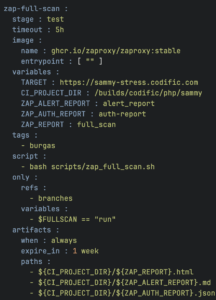
Thus here is what our GitLab’s CI/CD YAML file looks like for the ZAP full active scan.
Conclusion
Integrating ZAP into GitLab CI/CD pipelines provides automated security testing that scales with your development process. The combination of daily passive scanning and weekly active scanning creates a robust security testing strategy that catches vulnerabilities early in the development lifecycle.
What does the Codific team build with ZAP and Gitlab?
Codific is a team of security software engineers that leverage privacy by design principles to build secure cloud solutions. We build applications in different verticals such as HR-tech, Ed-Tech and Med-Tech. Secure collaboration and secure sharing are at the core of our solutions.
Videolab is used by top universities, academies and hospitals to put the care in healthcare. Communication skills, empathy and other soft skills are trained by sharing patient interview recordings for feedback.
SARA is used by top HR-Consultants to deliver team assessments, psychometric tests, 360 degree feedback, cultural analysis and other analytical HR tools.
SAMMY Is a Software Assurance Maturity Model management tool. It enables companies to formulate and implement a security assurance program tuned to the risks they are facing. That way other companies can help us build a simple and safe digital future. Obviously our AppSec program and SAMMY itself is built on top of it.
We believe in collaboration and open innovation, we would love to hear about your projects an see how we can contribute in developing secure software and privacy by design architecture. Contact us.