Updated: 1 December, 2025
30 July, 2025
Your DevSecOps pipeline is fast, automated, and built to scale. But is security truly integrated, or just assumed? The OWASP DevSecOps Maturity Model (DSOMM) helps teams answer that question with clarity and structure.
DSOMM provides a way to assess how well your security practices align with the way your teams actually build and operate software. It helps identify blind spots, track progress, and support consistent improvement.
In this post, we will explore how the model works, how it compares to other maturity frameworks, and how you can begin applying it to improve security across your DevSecOps workflows. For those looking to operationalize DSOMM assessments, we also introduce SAMMY, a platform built for maturity tracking and team collaboration.
Listen to the summary of this article on The AppSec Management Podcast:
Key Takeaways
- DSOMM is a maturity model focused on integrating security directly into DevSecOps workflows through concrete, technical activities.
- Each activity is tied to a specific maturity level and includes clear guidance on risk, measurement, difficulty, and usefulness.
- Compared to SAMM, BSIMM, and NIST CSF 2.0, DSOMM offers the most actionable path for technical teams working in modern delivery pipelines.
- The model supports an iterative improvement process where activities are evaluated, validated, improved, or accepted based on risk.
- Platforms like SAMMY make it easier to assess, track, and coordinate DSOMM maturity across teams.
What is OWASP DSOMM?
The OWASP DevSecOps Maturity Model (DSOMM) is a framework for evaluating how effectively security is integrated into DevSecOps practices. As a maturity model, it defines progressive levels of capability, allowing teams to assess where they stand today and what more advanced practices look like. It helps identify gaps, guide improvements, and track progress over time.
Why does DevSecOps Need a Maturity Model?
According to GitLab’s 2024 Global DevSecOps Report, 58 percent of security professionals say they struggle to get development teams to prioritize the remediation of vulnerabilities. More than half report that vulnerabilities are still mostly discovered after code is merged into a test environment.
This highlights a disconnect between the promise of DevSecOps and what happens in practice. Many teams aim to shift security left, but few have a reliable way to measure how well that shift is actually working.
A maturity model like DSOMM helps close that gap. It provides a structured way to evaluate how security is embedded into development and operations. It highlights blind spots, supports alignment across roles, and makes progress visible and actionable.
By mapping activities to maturity levels, DSOMM helps teams focus their efforts, prioritize what matters most, and track meaningful improvement over time.
How is DSOMM Structured?
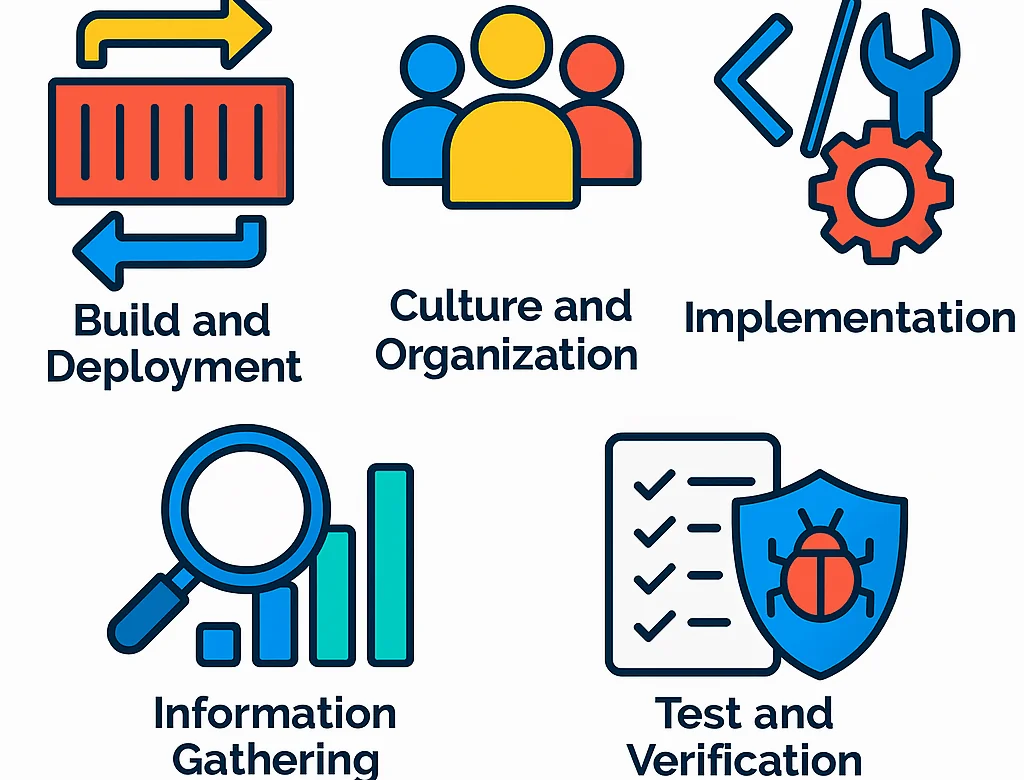
OWASP DSOMM is organized into five core dimensions that cover key areas of modern DevSecOps workflows:
- Build and Deployment
- Culture and Organization
- Implementation
- Information Gathering
- Test and Verification
Each dimension contains sub-dimensions focused on specific topics. For example, Build, Design, Application Hardening, Logging, and Test KPI. These sub-dimensions include defined security activities that can be assessed for maturity.
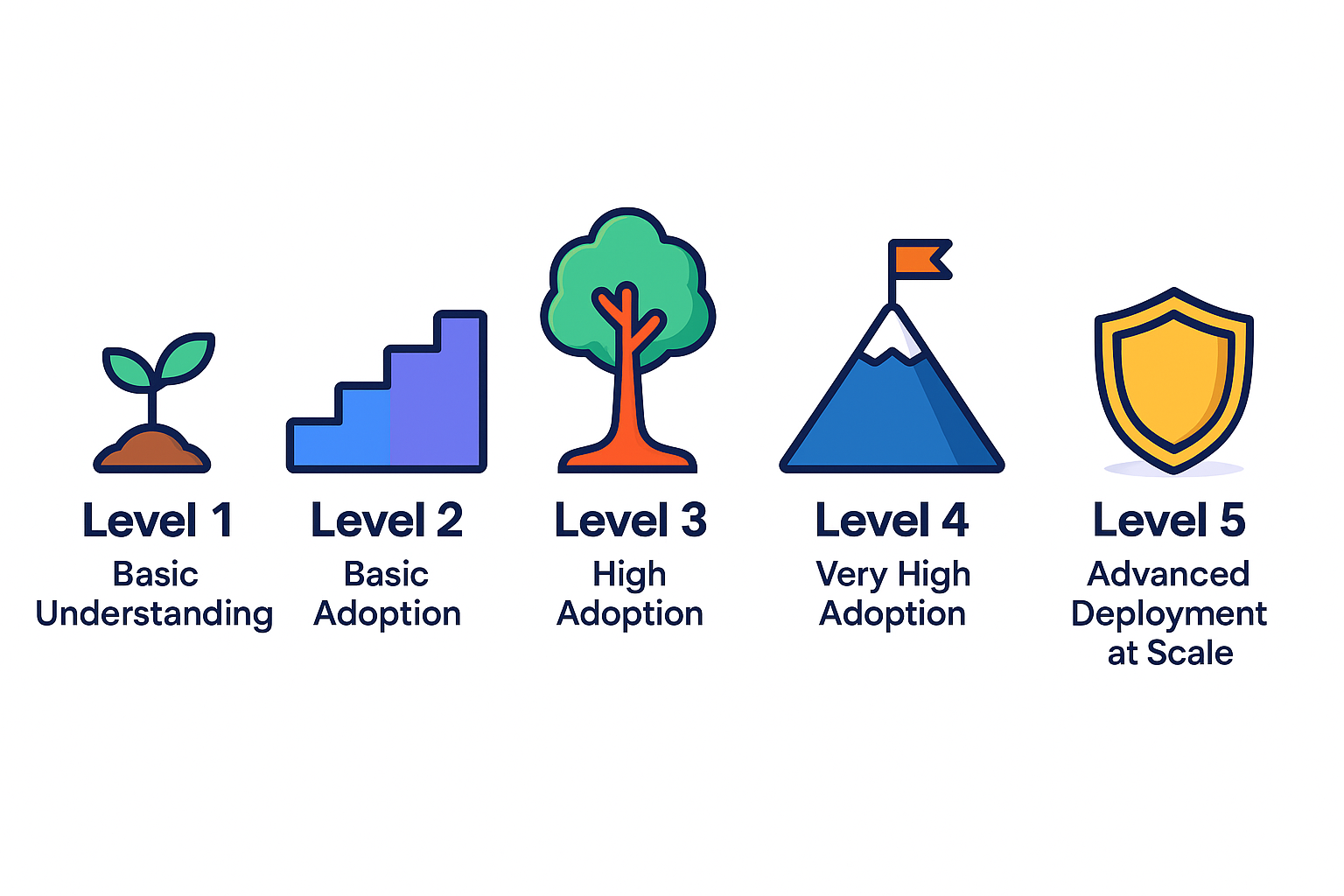
Each sub-dimension is structured around a five-level maturity scale:
- Level 1: Basic understanding of security practices
- Level 2: Adoption of basic security practices
- Level 3: High adoption of security practices
- Level 4: Very high adoption of security practices
- Level 5: Advanced deployment of security practices at scale
Not every sub-dimension includes all five levels. Some may begin at Level 2, skip a level, or end earlier. This is intentional. Maturity levels are only defined when they are relevant and meaningful for the specific topic.
For each maturity level within a sub-dimension, DSOMM defines a set of activities. Achieving a given maturity level means the team has implemented all of the activities defined for that level. This gives teams a practical and measurable way to assess current capabilities, plan improvements, and track progress over time.
Zooming in to DSOMM’s Maturity Levels
Like OWASP SAMM, OWASP DSOMM is a prescriptive model. It does not only assess where your security practices stand, it also provides concrete guidance on how to improve them. Each maturity level includes a set of specific activities that teams can implement to strengthen their DevSecOps posture.
What sets DSOMM apart is the level of detail included for each activity. For every item, the framework outlines the risk it mitigates, how its implementation can be measured, how difficult it is to adopt, and how useful it is considered. This makes DSOMM highly actionable for technical teams.
Below is a closer look at what each maturity level represents, with examples of activities from across the five DSOMM dimensions.
Maturity Level 1: Basic Understanding of Security Practices
At Level 1, teams begin laying the groundwork for security by addressing fundamental practices across different parts of the DevOps workflow. These activities are simple, but they introduce the consistency and visibility needed for future growth.
Examples of activities:
- Build and Deployment / Inventory → Inventory of production components:
Maintain a basic inventory of deployed components to support visibility and control over what is running in production. - Culture and Organization / Design → Conduction of simple threat modeling on technical level:
Apply simple threat modeling techniques to help teams identify and discuss risks early in design. This can include basic checklists or informal whiteboarding using methods like STRIDE. - Implementation / Application Hardening → App. Hardening Level 1 (50%):
Begin hardening in-house code by applying foundational guidance from resources like the OWASP Cheat Sheet Series and the Security Knowledge Framework. - Information Gathering / Monitoring → Simple application metrics: Collect a limited set of basic application metrics to support early detection of suspicious behavior, such as failed logins or traffic anomalies.
- Test and Verification / Consolidation → Treatment of defects with severity high or higher: Integrate high or higher severity vulnerabilities into the quality gate to ensure they are tracked and addressed before progressing through the development pipeline.
Maturity Level 2: Adoption of Basic Security Practices
At Level 2, security becomes more structured and visible. Teams go beyond awareness by starting to communicate expectations, standardize practices, and make results easier to interpret and act on.
Examples of activities:
- Build and Deployment / Deployment → Inventory of production artifacts: Maintain a documented inventory of production components, either manually or using automated tools such as Kubernetes queries or Dependency-Track.
- Culture and Organization / Design → Information security targets are communicated: Ensure that senior management communicates security targets clearly and in a timely way, so that teams understand the goals and are more likely to support and engage with them.
- Implementation / Application Hardening → App. Hardening Level 1: Apply basic hardening practices to in-house code using guidance from resources such as the OWASP Application Security Verification Standard (ASVS) to address common vulnerabilities.
- Information Gathering / Monitoring → Visualized metrics: Present security-related metrics in a user friendly way.
- Test and Verification / Consolidation → Simple visualization of defects: Provide a visual overview of security vulnerabilities to help teams track and understand open issues.
Maturity Level 3: High Adoption of Security Practices
At Level 3, security practices are well-established and integrated into everyday work. Teams apply structured methods, expand their focus to business impact, and use metrics to improve speed and clarity.
Examples of activities:
- Build and Deployment / Deployment → Inventory of production dependencies: Keep a documented list of dependencies used in production artifacts like containers and images to support transparency and reduce hidden risks.
Culture and Organization / Design → Conduction of simple threat modeling on business level: Perform basic threat modeling focused on business logic and functionality, enabling early detection of risks. - Implementation / Application Hardening → App. Hardening Level 2 (75%): Apply around 75 percent of the recommendations from frameworks like the OWASP ASVS Level 2 or the OWASP Mobile Application Verification Standars (MASVS) Level 2 to strengthen application security.
- Information Gathering / Monitoring → Grouping of metrics: Group related metrics meaningfully, such as by function or domain, to help teams interpret data faster and identify patterns during incidents.
- Test and Verification / Consolidation → Treatment of defects with severity middle: Integrate medium severity vulnerabilities into the quality gate to ensure they are tracked and addressed before progressing through the development pipeline.
Maturity Level 4: Very High Adoption of Security Practices
At Level 4, security practices are embedded across teams and environments. The focus shifts to risk prevention, advanced analysis, and improving visibility at scale.
Examples of activities:
- Build and Deployment / Deployment → Usage of feature toggle: Use static, environment-independent feature toggles to reduce the risk of accidentally enabling insecure functionality in production.
- Culture and Organization / Design → Conduction of advanced threat modeling: Use detailed, code-driven threat models to guide security decisions across architecture and implementation, as illustrated by the High Maturity Scenario of the OWASP Integration Standards project.
- Implementation / Application Hardening → App. Hardening Level 2: Fully implement the recommendations from OWASP ASVS Level 2 or OWASP MASVS Level 2.
- Information Gathering / Monitoring → Advanced App. Metrics: Instrument all security defects identified in the Test and Verification dimension.
- Test and Verification / Consolidation → Advanced visualization of defects: Visualize security findings by component, project, or team.
Maturity Level 5: Advanced Deployment of Security Practices at Scale
At Level 5, security is fully embedded into every part of the delivery process. Practices are proactive, repeatable, and automated, with advanced coverage across both technical and organizational layers.
Examples of activities:
- Build and Deployment / Deployment → Blue/Green Deployment: Apply a blue/green deployment strategy to maintain high availability and reduce risk, making rollbacks simpler in the event of a failed release.
- Culture and Organization / Design → Creation of advanced abuse stories: Create detailed abuse scenarios as part of threat modeling.
- Implementation / Application Hardening → App. Hardening Level 3: Implement between 95 and 100 percent of the recommendations from OWASP ASVS Level 3 or OWASP MASVS to reach the highest standard of application hardening.
- Information Gathering / Monitoring → Metrics are combined with tests: Combine metrics collection with testing activities to identify subtle programming issues.
- Test and Verification / Consolidation → Treatment of all defects: Integrate all identified vulnerabilities, regardless of severity, into the quality gate to ensure no issues are overlooked in the development process.
These examples show how DSOMM provides not just structure, but actionable steps at every stage of maturity. Whether your team is just getting started or already far along, the model helps you focus your efforts where they matter most.
What are the advantages and disadvantages of DSOMM?
As with any framework, OWASP DSOMM has clear strengths and some limitations. Understanding both helps you decide whether it fits your team’s DevSecOps needs.
Advantages
- Actionable at the engineering level: DSOMM provides clear, specific activities for each maturity level, making it easier for technical teams to take concrete steps.
- DevOps-native structure: The model is built around how software is actually delivered today, aligning naturally with CI/CD pipelines, automation, and team ownership.
- Flexible and modular: You can start with a single sub-dimension or team, then expand iteratively across your organization.
- Shared maturity model language: Helps align security, engineering, and product teams by framing conversations around observable practices rather than opinions.
Disadvantages
- No built-in collaboration tools: The official implementation stores progress locally in the browser, making cross-team coordination difficult without third-party tools.
- Frequent updates: DSOMM evolves quickly and does not prioritize backward compatibility. This flexibility enables fast iteration, but may create challenges if you are using the model as part of an organization-wide governance or reporting process.
- High specificity: DSOMM activities are very concrete and map well to modern development workflows. However, applying them to legacy systems or externally delivered software may require additional interpretation or adaptation.
If your teams work in fast-paced DevOps environments and need a model that matches their delivery reality, DSOMM offers a strong, actionable foundation.
How does DSOMM compare to OWASP SAMM, BSIMM and NIST CSF 2.0?
OWASP DSOMM is one of several frameworks designed to assess and improve security practices. While it shares common goals with models like OWASP SAMM, BSIMM, and NIST CSF 2.0, each takes a different approach, targets different audiences, and aligns differently with modern DevSecOps workflows.
The table below offers a high-level comparison to help you understand where DSOMM fits within the broader landscape.
| Framework | Type | Focus Area | Approach | Target Audience | DevSecOps Alignment |
| DSOMM | Maturity model | Secure practices in DevSecOps pipelines | Technical, activity-driven | DevSecOps & Security Engineers | High — built for modern delivery workflows |
| OWASP SAMM | Maturity model | Software assurance and governance | Process- and goal-driven | Security leaders, AppSec teams | Medium — adaptable, less specific to CI/C |
| BSIMM | Benchmarking- based maturity model | Observed practices across organizations | Descriptive, survey-based | Large orgs benchmarking security programs | Low — focused on high-level SSDL activity |
| NIST CSF 2.0 | Cybersecurity maturity framework | Enterprise cybersecurity risk management | Outcome
focused |
Risk, compliance, and security teams | Low — broader than software delivery focus |
Comparison of Models
Compared to these models, OWASP DSOMM stands out for its technical focus and tight alignment with modern DevSecOps workflows. It is built for engineering teams actively deploying code through automated pipelines, with activities that are granular, specific, and mapped directly to real tools and practices.
OWASP SAMM, by contrast, takes a broader organizational view. It focuses on security governance, risk, compliance, and process maturity across the software lifecycle. SAMM is highly structured and stable, making it ideal for long-term governance programs. However, it can feel abstract for teams looking to apply security directly inside CI/CD workflows. Many organizations benefit from using SAMM to set goals and DSOMM to operationalize them.
Want to see a more in-depth analysis of how it compares to DSOMM? Then consult our article on “DSOMM vs SAMM”.
BSIMM is descriptive rather than prescriptive. It documents what many mature organizations are doing, but does not offer concrete guidance on what your team should do next. DSOMM offers a path forward, with actionable activities and maturity levels that support real engineering choices.
NIST CSF 2.0 is excellent for managing cybersecurity at the enterprise level, but it lacks the detailed engineering depth required for secure software development. DSOMM fills that gap by helping teams translate high-level outcomes into day-to-day practices within the delivery lifecycle.
Are you interested in learning how BSIMM and NIST CSF 2.0 compare to other frameworks like OWASP SAMM? Then you should check out the following two articles: “A Comparison of NIST CSF 2.0 and OWASP SAMM” and “BSIMM vs SAMM: Which model is better?”
If your organization is focused on modern infrastructure, automation, and continuous delivery, DSOMM is a strong fit. It also complements broader models like SAMM or NIST CSF by grounding maturity in hands-on technical implementation.
How to Implement DSOMM
Implementing OWASP DSOMM begins with aligning your security efforts to your actual risk. Rather than enforcing a one-size-fits-all checklist, DSOMM is designed to support continuous improvement through informed decision-making.
The core of the implementation process is a structured, repeatable loop that can be applied to each activity in the framework:
- Evaluate your current maturity by reviewing whether the activity is already in place.
- If needed, validate that evaluation with peers or stakeholders.
- Based on your risk appetite, either accept the current state or select the activity for improvement.
- Once implemented, mark it as complete. Activities may be revisited later if priorities shift or if improvements expire.
This loop allows teams to track maturity over time and make progress at a sustainable pace. You can begin with just one sub-dimension that aligns with current priorities and expand from there. The model encourages iteration, shared ownership, and consistent evaluation across the DevSecOps lifecycle.
Although DSOMM can be adopted manually, it becomes far more effective with dedicated tooling. SAMMY is a purpose-built platform that helps teams assess, prioritize, and track their DSOMM maturity. It simplifies collaboration and provides a clear view of where you stand and where to go next.
Start Implementing OWASP DSOMM with Confidence
DSOMM is more than a framework, it is a practical way to track and improve security maturity across your DevSecOps workflows. That is where SAMMY comes in.

With SAMMY, you can:
-
Run and validate DSOMM assessments across teams
-
Track maturity levels for every activity in the model
-
Identify gaps and prioritize improvements based on real risk
-
Monitor progress over time with clear, visual dashboards
Ready to assess and improve your DevSecOps maturity?
Click below to get started for free.
Conclusion
OWASP DSOMM brings structure and clarity to the evolving world of DevSecOps. It translates security objectives into practical, engineering-focused activities that can be measured, improved, and scaled. By breaking down security maturity into distinct levels and well-defined activities, it allows teams to prioritize based on real risk and available capacity.
Whether used on its own or alongside frameworks like OWASP SAMM or NIST CSF, DSOMM offers a flexible way to embed security into how software is built and delivered today. And with tools like SAMMY, organizations can take that process even further, making security maturity a shared, trackable, and continuous effort across teams.
Official pages of the frameworks and regulations mentioned in this blog
- OWASP DSOMM (DevSecOps Maturity Model)
- OWASP SAMM (Software Assurance Maturity Model)
- BSIMM (Building Security In Maturity Model)
- NIST CSF 2.0 (Cybersecurity Framework)
- ISO 27001
- OWASP ASVS (Application Security Verification Standard)
- OWASP Mobile Application Verification Standars (MASVS)
- Security Knowledge Framework
- STRIDE