24 October, 2025
Automated Application Security Testing (AAST) refers to the use of software tools to identify vulnerabilities in applications with minimal human intervention. These tools continuously scan source code, dependencies, and running applications to detect flaws that could be exploited by attackers. By automating repetitive testing tasks, security and development teams can maintain coverage and consistency across every build and release.
Automated testing can occur at different stages of the software development lifecycle. Static Application Security Testing (SAST) analyzes source code before it runs. Dynamic Application Security Testing (DAST) evaluates running applications in real time. Interactive Application Security Testing (IAST) combines both approaches. Software Composition Analysis (SCA) scans all software components, including open-source, proprietary, and internal libraries, and in modern platforms extends to container and SBOM analysis for complete visibility.
Automation allows organizations to keep pace with agile and DevOps development cycles by embedding security directly into CI/CD pipelines instead of treating it as an afterthought. However, automation is only as effective as its implementation. Without structure, testing can become fragmented or inconsistent. That’s why frameworks like OWASP SAMM’s Scalable Baseline are essential for guiding maturity, and tools like SOOS provide the practical foundation to make that automation measurable, scalable, and effective.

Types of Automated Application Security Testing
Automated application security testing includes several complementary methods that identify vulnerabilities throughout the software development lifecycle. Each method focuses on a different aspect of the application, and together they provide complete visibility into security weaknesses from code to runtime.
1. Static Application Security Testing (SAST)
SAST examines an application’s source code or binaries before it runs. It looks for coding flaws such as input validation errors, injection risks, and insecure data handling. SAST can be integrated directly into development environments or CI/CD pipelines, allowing developers to find and fix issues early in the process. It is one of the most effective ways to implement secure coding practices at scale.
2. Dynamic Application Security Testing (DAST)
DAST evaluates a running application by simulating real attacks from an external perspective. It detects vulnerabilities such as broken authentication, cross-site scripting, and security misconfigurations. Because it does not require access to source code, DAST is useful for testing web applications in staging or production environments and verifying that defenses perform as expected.
3. Interactive Application Security Testing (IAST)
IAST combines elements of both static and dynamic testing. It monitors the application while it runs, analyzing how data flows through the system and how code executes in real time. This hybrid approach helps reduce false positives and provides developers with detailed insights into where and how vulnerabilities occur. IAST is often used in modern CI/CD pipelines for its balance of accuracy and automation.
4. Software Composition Analysis (SCA)
SCA identifies vulnerabilities and licensing risks across all software components, not just open-source or third-party libraries. It scans dependencies, proprietary modules, and packages to detect known issues and improve supply chain transparency. In modern platforms, SCA often extends to container and SBOM analysis, helping teams maintain an accurate inventory of both internal and external software assets.
| Testing Type | When It Runs | What It Tests | Key Strengths |
| SAST | Before runtime (in code or build stage) | Source code or binaries | Finds coding flaws early and supports shift-left security |
| DAST | During runtime (staging or production) | Running web applications | Detects real-world vulnerabilities such as XSS or authentication issues |
| IAST | During runtime with code-level insight | Application behavior and data flow | Offers high accuracy and detailed context for developers |
| SCA | During build and deployment | Software dependencies and components | Identifies known vulnerabilities in software dependencies |
Together, these testing methods ensure that security is addressed from development to deployment. By combining static, dynamic, interactive, and composition analysis, teams can maintain continuous visibility into risks and prevent vulnerabilities from reaching production.
Why Automate Application Security Testing?
Modern software development moves fast, and so do security risks. Manual testing alone cannot keep pace with the rapid release cycles of agile and DevOps environments. Automating application security testing ensures that every change, commit, and deployment is continuously checked for vulnerabilities without slowing development down.
Automation improves coverage, consistency, and speed. It enables teams to test every component across multiple environments, reducing the likelihood that critical issues slip through unnoticed. Automated testing tools can run around the clock, catching problems as soon as they are introduced, long before they reach production. This early detection not only strengthens security but also lowers the cost of remediation, since fixing vulnerabilities earlier in the lifecycle is significantly cheaper than addressing them post-release.
Automation also helps standardize security practices across teams and projects. It removes dependency on individual testers and integrates security directly into the development workflow. This consistency ensures that quality and security controls remain the same across different products and environments.
Finally, automated testing supports scalability. As organizations expand their codebases and development teams, automation ensures that security efforts can grow proportionally. Rather than relying on manual testing bottlenecks, teams can maintain visibility and control as software delivery accelerates. In short, automation transforms security from a reactive process into a proactive, continuous part of development.
Guidance to Manage your Automated Application Security Testing Implementation
The OWASP Software Assurance Maturity Model (SAMM) provides a structured approach for improving and measuring the maturity of software security programs. Within SAMM’s Security Testing practice, the Scalable Baseline stream focuses on how organizations implement and manage automated application security testing as they grow in maturity.
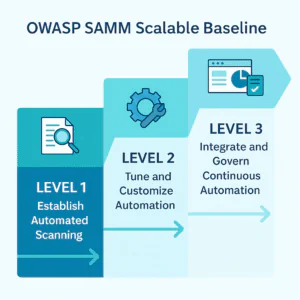
SAMM describes three maturity levels that reflect how automation evolves from simple scanning to a fully integrated, organization-wide capability. Below is a summary:
| Maturity Level | Objective | Typical Activities | Expected Outcomes |
| Level 1 – Establish Automated Scanning | Introduce automated testing and achieve consistent coverage across applications. | • Deploy SAST, DAST, or IAST tools to detect common vulnerabilities. • Increase test frequency and coverage over time. • Choose tools suited to your tech stack and development processes. |
• Automated tests run regularly. • Developers receive actionable findings. • Testing shifts from ad-hoc to structured and repeatable. |
| Level 2 – Tune and Customize Automation | Improve accuracy, efficiency, and relevance of automated testing. | • Tune tools for specific languages and frameworks. • Suppress false positives and extend detection rules. • Pilot tuning with motivated teams before scaling. |
• Automation produces trustworthy, low-noise results. • Broader coverage with fewer false alarms. • Stronger developer engagement and feedback loops. |
| Level 3 – Integrate and Govern Continuous Automation | Embed automated testing fully into development and delivery pipelines and manage it strategically. | • Integrate tests into CI/CD workflows. • Monitor results continuously through dashboards. • Correlate findings across tools and link to defect management. • Document accepted risks and remediation timelines. |
• Continuous, governed security testing. • Centralized reporting and metrics. • Evidence-based improvements and accountability. |
As organizations progress through these levels, automated testing evolves from simple tool use into a continuously improving, organization-wide practice. The Scalable Baseline stream ensures that automation not only detects vulnerabilities efficiently but also becomes a sustainable, measurable component of secure software delivery.
Using SOOS to Achieve Each Maturity Level in OWASP SAMM’s Scalable Baseline
The OWASP SAMM Scalable Baseline stream outlines how organizations can gradually improve the automation and governance of their security testing. SOOS provides a practical way to achieve this progression by combining static and dynamic analysis with centralized management, flexible integrations, and governance features that scale with your security program.
Below is how SOOS supports each maturity level of the Scalable Baseline stream.
Maturity Level 1: Establish Automated Scanning
At the first level, the goal is to create a consistent baseline for automated testing. SOOS makes this step straightforward by helping teams quickly deploy scanning tools that provide actionable and verifiable results.
How SOOS supports Level 1:
- Fast setup and integration: SOOS SCA, SAST, and DAST can be deployed quickly with GitHub Actions, Jenkins, GitLab, Azure DevOps, and other CI/CD tools.
- Start with SCA for clarity: SCA is fast, explicit, and provides a clear inventory of all software components. It shows how dependencies are introduced, highlights known vulnerabilities, and gives teams immediate visibility into their software supply chain.
- Inventory and compliance value: Running SCA first creates a trusted inventory of first, second, and third-party components, which supports vulnerability tracking, research, and regulatory compliance.
- Low-friction adoption: The lightweight CLI and Docker-based setup allow scans to run locally or in pipelines with minimal configuration.
- Baseline visibility: Once SCA coverage is in place, SAST can be introduced to analyze source code and identify insecure coding patterns, while DAST, powered by an integrated ZAP engine, provides immediate feedback on exposed endpoints in running applications.
By beginning with SCA, teams gain a dependable foundation and visibility into their software landscape. From there, adding SAST and DAST expands coverage to both code and runtime, forming a repeatable baseline for automated testing.
Maturity Level 2: Tune and Customize Automation
At this level, the focus shifts from simply running automated scans to refining and scaling them across the organization. With SCA, SAST, and DAST now in use, teams begin tuning results for accuracy, filtering noise, and customizing rules to match their technology stacks. SOOS provides flexible management and control features that make this tuning process effective and sustainable, allowing organizations to evolve from basic automation toward reliable, high-confidence testing.
How SOOS supports Level 2:
- Comprehensive issue management: All SCA, SAST, and DAST findings are represented as issues with workflows to mark them as Unaddressed, Pending, Suppressed, or Resolved.
- Flexible suppression and attestation controls: Users can Attest, Snooze, Waive, or flag False Positives and apply suppression scopes at different levels, from a single issue to all projects in the organization.
- Risk-based prioritization: Dashboards allow filtering and sorting by exploitability, severity (CVSS), fix availability, and compliance deadlines.
- Configurable thresholds: Teams can set rules that break builds or send notifications based on issue type and severity, allowing them to gradually increase enforcement as confidence grows.
- Targeted scanning and tuning: The SOOS DAST CLI allows users to include or exclude specific technologies, while flexible configuration options let teams fine-tune other scan types for greater precision and relevance.
With these features, SOOS empowers teams to mature their automation by building trust in the results and focusing resources on the most critical vulnerabilities.
Maturity Level 3: Integrate and Govern Continuous Automation
At the highest level, automated testing becomes fully embedded into the development and governance structure. SOOS provides the flexibility and visibility needed to manage testing as a continuous, organization-wide process.
How SOOS supports Level 3:
- Extensive integration options: Through the SOOS CLI, API, and helper scripts, scans can be triggered automatically on every commit or pull request across virtually any CI/CD platform. GitHub Webhooks, VS Code plugins, and custom scripts make integration seamless.
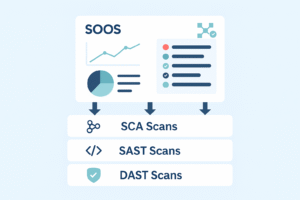
- Unified dashboards and reporting: SOOS consolidates results from SCA, SAST, DAST, SBOM, and container scans into global dashboards, offering real-time insights into trends and security posture across projects.
- Centralized governance: Deduplicated issues from all scan types are displayed in a single list, with clear issue states (Unaddressed, Pending, Suppressed, Resolved). Teams can track remediation progress, correlate findings, and manage exceptions consistently.
- Comprehensive visibility and history: Every scan is logged and archived, allowing teams to review historical results, compare trends, and export SBOMs or other evidence for audits and compliance reporting.
At this stage, SOOS enables continuous, governed security testing where all findings feed into unified dashboards and established workflows. This transforms automation from a development-side task into a measurable, organization-wide capability for ongoing risk reduction and compliance assurance.
Summary Table of How SOOS Supports Maturity in Security Testing
| SAMM Maturity Level | Objective | How SOOS Supports It |
| Level 1 – Establish Automated Scanning | Introduce automated testing and achieve consistent coverage across applications. | • Quick setup and CI/CD integrations with GitHub Actions, Jenkins, GitLab, Azure DevOps, and more. • Start with SCA for fast, explicit results and a clear inventory of all software components. • SAST and DAST can be added to expand coverage across code and running applications. • Lightweight CLI and Docker-based setup enable frictionless adoption. |
| Level 2 – Tune and Customize Automation | Improve accuracy and efficiency through tuning, prioritization, and workflow management. | • Unified issue management across SCA, SAST, and DAST with workflows for Unaddressed, Pending, Suppressed, and Resolved. • Controls for Attest, Snooze, Waive, and False Positive handling with suppression scopes from single issue to organization-wide. • Risk-based prioritization using exploitability, CVSS, fix availability, and compliance filters. • Configurable build and notification thresholds to gradually increase enforcement. • Targeted scanning through DAST CLI and customizable rules across scan types. |
| Level 3 – Integrate and Govern Continuous Automation | Fully embed automated testing in CI/CD and manage results across the organization. | • Flexible integration via SOOS CLI, API, Webhooks, IDE plugins, and helper scripts. • Centralized dashboards combining SCA, SAST, DAST, SBOM, and container scan results. • Deduplicated issue tracking and governance workflows with defined states (Unaddressed, Pending, Suppressed, Resolved). • Comprehensive visibility through historical scan data, trend comparisons, and exportable audit evidence. |
The OWASP SAMM Scalable Baseline provides a clear framework for building automation maturity, and SOOS delivers the practical tools to make that journey achievable. By starting with fast, explicit SCA scanning, teams gain immediate visibility into their software components and dependencies, laying the foundation for a sustainable AppSec program.
As automation matures, SOOS extends that foundation with SAST and DAST capabilities, centralized dashboards, flexible integrations, and governance controls. This combination allows organizations to move from simple scanning to fully managed, continuous automation. The result is measurable progress, clear visibility, and a scalable, organization-wide approach to application security.
Best Practices for Automating Application Security Testing
Automation delivers the best results when it’s supported by clear processes and continuous improvement. These best practices help teams get the most value from their automated testing efforts.
- Start broad, then deepen coverage
Begin with automated scans for your most critical applications and components, then expand to additional services, APIs, and environments as your program matures. - Integrate security early in development
Embed scans directly into CI/CD pipelines and source repositories so vulnerabilities are detected as early as possible, before release. - Tune your tools regularly
Review and adjust rules, suppression settings, and notification thresholds to maintain accuracy and reduce alert fatigue. - Prioritize based on risk
Use severity scores, exploitability data, and exposure insights to focus remediation on issues that present the highest risk to the business. - Track progress and measure improvement
Monitor metrics such as scan frequency, time to remediate, and recurring issue trends to demonstrate measurable maturity growth. - Combine automation with expert review
Automated tools can identify many issues, but combining them with manual validation, threat modeling, and code reviews ensures deeper insight and better context.
Strengthen Your Security Testing with SOOS
Security maturity starts with visibility and automation, and SOOS provides the tools to get you there. Automated testing is a key part of OWASP SAMM’s Scalable Baseline, ensuring vulnerabilities are identified and managed consistently. SOOS unifies SCA, SAST, and DAST scanning in one platform, centralizing findings, reducing noise, and helping teams scale security across their development pipelines.

With SOOS, you can:
🔹 Run SCA, SAST, and DAST scans directly from your CI/CD workflows.
🔹 Prioritize findings with flexible suppression, attestation, and scoring controls.
🔹 Track remediation with centralized dashboards and issue workflows.
🔹 Automate scans and reporting through the SOOS CLI, API, and integrations.
🔹 Build continuous assurance with historical data, audit trails, and SBOM visibility.
Ready to take your automation to the next level?
Explore SOOS and see how it helps teams progress through OWASP SAMM’s Scalable Baseline maturity levels.
Conclusion
Automating application security testing is a crucial step toward building secure software at scale. OWASP SAMM’s Scalable Baseline provides a clear framework for developing that capability, and SOOS delivers the practical tools to make it achievable.
By starting with SCA for visibility and inventory, then expanding to SAST and DAST for deeper coverage, teams can embed security directly into their development workflows. With continuous tuning and centralized governance, automation evolves from routine scanning into measurable assurance across the entire organization.